

You do not need a finance degree, a complicated spreadsheet, or a perfect budget to take control of your money. To track your personal finances like a CFO, start with the questions a good financial leader asks: What do I have? Where did the money move? What is already committed? What decision should I make next?
The goal is not to turn your life into a corporation. It is to replace fragmented balances and vague assumptions with one clear system you can trust.
Track Your Personal Finances From One Complete Picture
A bank balance only shows one piece of your financial life. Your daily spending may sit across a current account, a credit card, cash, a fintech wallet, and a savings account. Looking at each app separately makes it difficult to answer a basic question: where do I actually stand?
Build a simple account inventory first. Include every place that holds money or affects your spending:
- current and savings accounts;
- credit cards;
- cash;
- digital wallets or fintech accounts;
- accounts used for shared household costs;
- investments or loans you want in the broader picture.
Keep currencies separate unless your system performs an explicit conversion. A total in RON and a total in EUR are useful; adding the raw numbers together is not.
Give Every Movement a Clear Meaning
A CFO does not treat every outgoing amount as an expense. Your personal system should not either.
Imagine that your salary enters your main account. You move part of it to savings, withdraw some cash, and buy groceries with a credit card. The savings movement and cash withdrawal change where the money sits. The grocery purchase changes what the money was used for.
Use three basic transaction types:
- Income adds new money to your financial picture.
- Expenses describe what you paid for, using consistent categories.
- Transfers move money between accounts you already own.
This distinction prevents the same money from appearing as spending twice. It also lets you answer two different questions: “Which account did I use?” and “What did I spend on?”
Replace Constant Checking With a Short Review Rhythm
Control does not require staring at your finances every day. It requires a routine that catches missing information before it becomes confusing.
Once a week, review recent transactions, classify anything unclear, and check cash purchases that may not appear elsewhere. At the end of the month, compare account balances, inspect category totals, and look ahead to scheduled bills and goals.
Consumer.gov’s budgeting guidance follows a similarly practical cycle: plan at the beginning of the month, record what you spend, and use the result to improve the next month. The useful habit is not perfect forecasting. It is closing the loop between your plan and reality.
Turn the Dashboard Into a Decision Tool
A financial dashboard should do more than display attractive charts. It should help you decide.
Before an optional purchase, check the balance of the account you would use, the remaining category budget, and the payments still ahead. Before moving money to savings, confirm that upcoming expenses remain covered. When spending increases, inspect the transactions behind the total instead of reacting to one large number.
That is the personal-CFO mindset: use the complete picture to choose the next action, while remembering that your bank or card provider remains the official source for available funds and posted transactions.
Use FinBara as Your Personal Finance Command Center
FinBara lets you represent bank accounts, cash, savings, credit, and other accounts in one system without connecting directly to your bank. Recorded income, expenses, and transfers keep those account balances meaningful, while the dashboard organizes monthly income, spending, savings, budgets, and goals by currency.
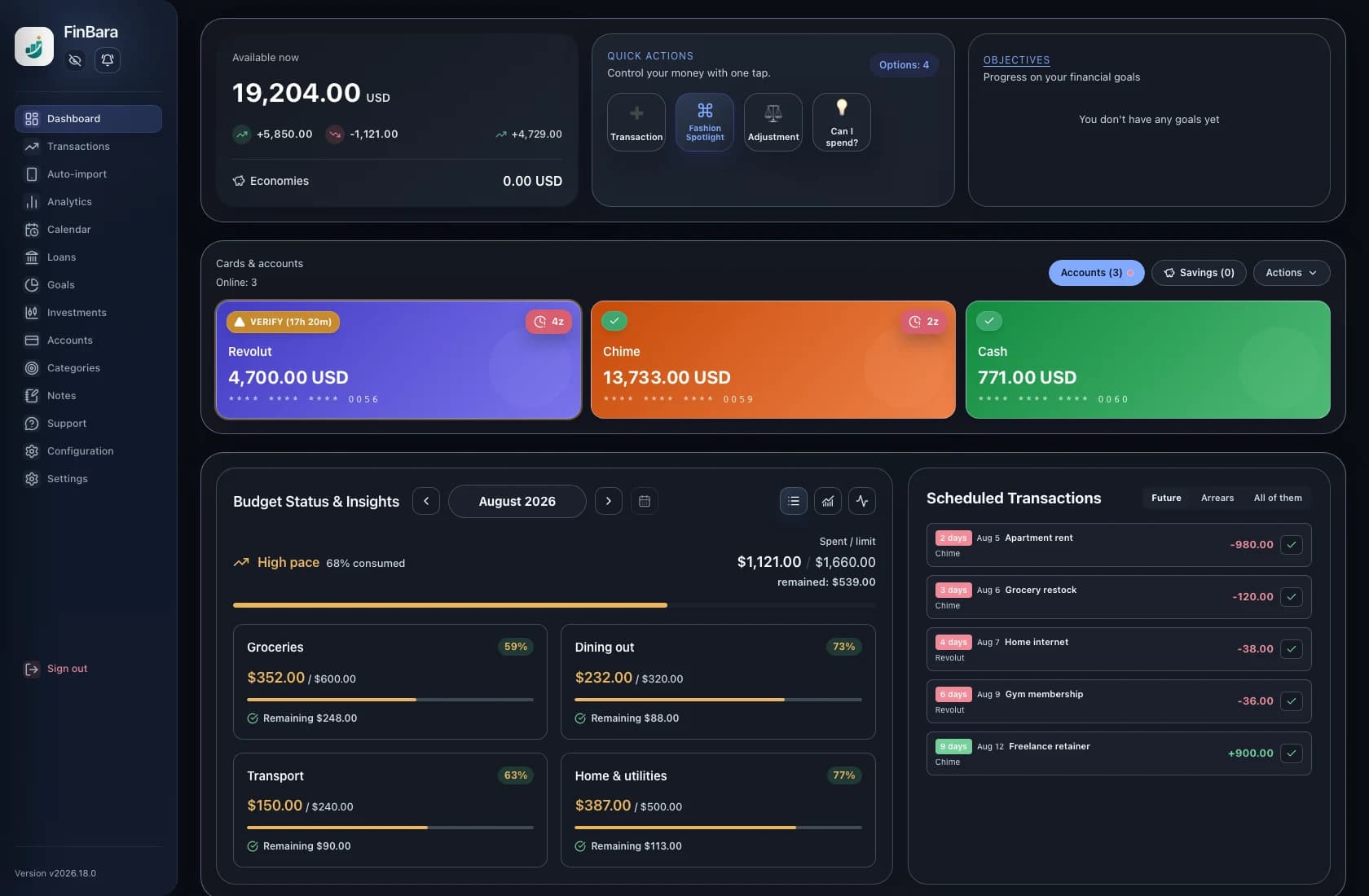
Instead of switching between unrelated balances, you can inspect all accounts in one place, open the personal finance dashboard, and investigate the transactions behind a monthly result. Transfers remain distinct from expenses, so moving money between your accounts does not have to distort the spending picture.
FinBara is a financial mirror, not a replacement for your bank. You choose what enters the system and verify it against reality. That deliberate control is exactly what makes the CFO metaphor useful: you own the information, understand the movements, and make the decision.
Quick answers
Frequently asked questions
Do I need to connect every bank account?
No. You can build a complete personal record manually or through the input methods you choose. FinBara does not require a direct bank connection.
How often should I review my finances?
A short weekly transaction review and a more complete monthly check are practical starting points. Adjust the rhythm to the number of accounts and transactions you manage.
Should transfers count as spending?
Usually not when money moves between accounts you own. Record the source and destination so both balances remain accurate, then count the eventual purchase in its real spending category.