
Financial planning
Master Your Finances: Financial Goal Planner 2026
Turn vague money goals into a practical plan connected to your real spending, budget, schedule, and progress.
You probably already know the feeling. Money comes in, bills get paid, card transactions pile up, Apple Pay handles half your daily spending, and somehow the month still ends with the question: where did it all go?
The challenge isn't more motivation. What's required is a financial goal planner that turns good intentions into decisions they can implement. “Save more” sounds responsible, but it doesn't tell you what to cut, what to automate, what to review, or how to tell whether you're on track.
The fix isn't more complexity. It's a cleaner system. One place to define the target, map it to real spending, schedule the actions, and review the results without handing over control to opaque syncing or black-box automation. If you want visibility across cards, cash, savings, and recurring expenses, a hands-on setup usually works better than a passive one. You see the inputs, you understand the outputs, and your plan reflects real life instead of an estimated snapshot.
From Vague Wishes to Actionable Plans
A lot of financial stress comes from fragmentation, not recklessness. One account holds salary, another handles bills, a credit card covers larger purchases, Apple Pay captures quick taps you barely remember, and cash disappears without leaving a trail. By the time you sit down to “plan,” you're already reconstructing the month from memory.
That's why broad goals usually collapse. They sound useful, but they don't tell you what to do on Tuesday. “Spend less” doesn't tell you whether the leak is food delivery, subscriptions, fuel, transfers to other accounts, or impulse buys hidden inside contactless payments.
Practical rule: A goal only becomes real when it changes a category, a schedule, or a transfer.
A working financial goal planner behaves more like a live workspace than a document. It connects four things that need to exist together: the target, the current baseline, the recurring actions, and the review habit. If one of those is missing, the plan gets fragile.
Here's what usually works better in practice:
- One destination at a time: Pick the main result first. A home down payment, travel fund, debt reduction, or emergency buffer.
- Visible money flow: Track what moves through cards, Apple Pay, cash, and transfers instead of relying on rough estimates.
- Category-level control: Look for the specific spending buckets that can fund the goal.
- Scheduled behavior: Decide in advance what happens on payday or at the start of the month.
The people who gain the most from a hands-on system are often the same people who are tired of “smart” tools doing things in the background. They don't want another feed of disconnected transactions. They want a planner that reflects what they chose, what they imported, what they labeled, and what they're deliberately moving toward.
The planner has to be usable in daily life
A good setup doesn't require perfect discipline. It requires repeatable actions. You import card activity, log cash when needed, categorize the messy parts once, and let your own rules handle the routine. That's different from giving up control. You're creating structure, not outsourcing awareness.
Financial clarity usually improves when you reduce guessing, not when you add more dashboards.
That's the core purpose of a financial goal planner. It doesn't just store goals. It creates a clear link between daily spending and long-term priorities so the plan survives ordinary months, not just ideal ones.
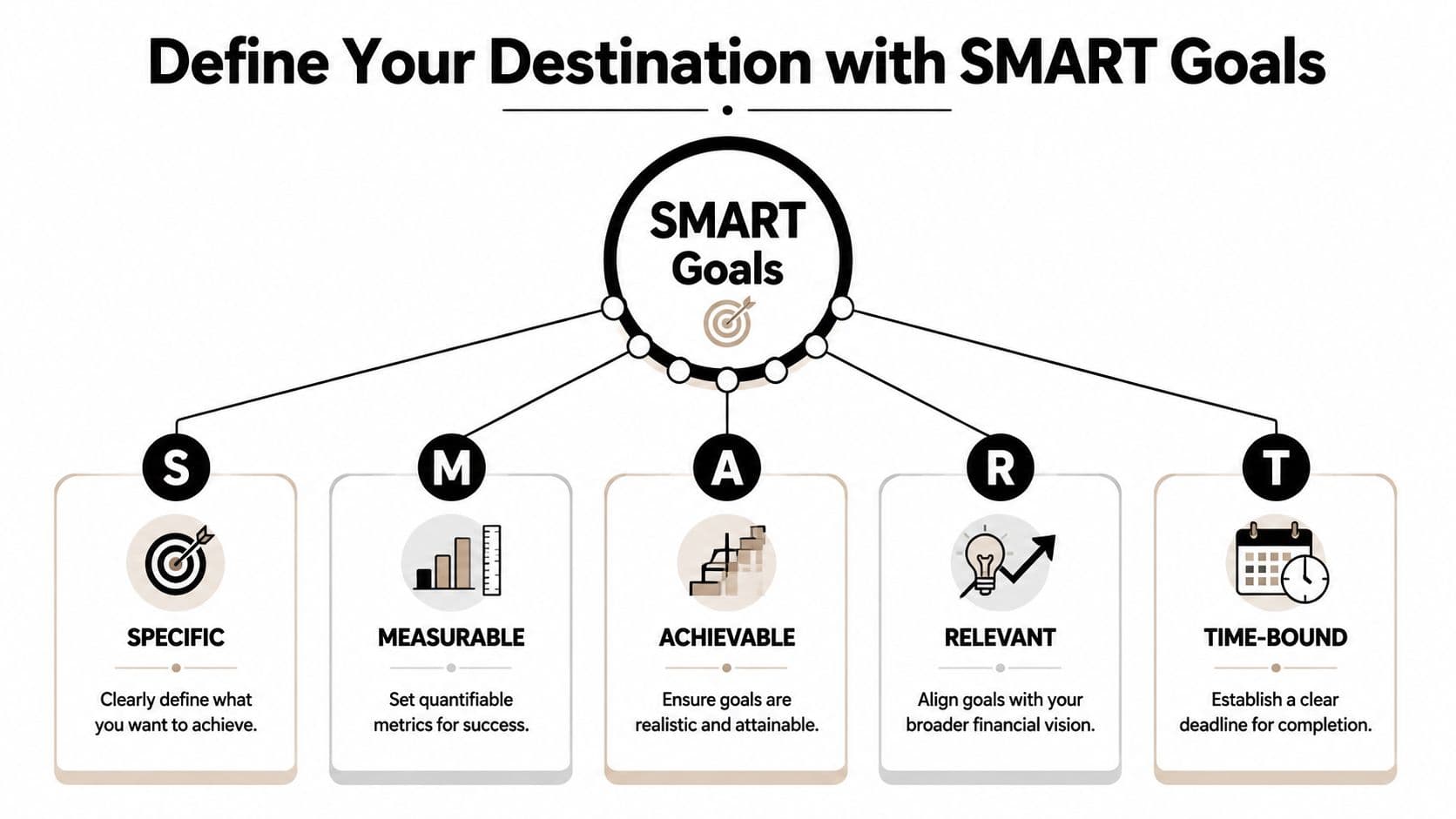
Define Your Destination with SMART Goals
The first job of a financial goal planner is naming the destination precisely enough that you can build around it. If the target is fuzzy, every later step gets weaker. Your budget becomes vague, your progress becomes hard to measure, and your review turns into gut feeling.
Why vague goals keep failing
Research on FinTech goal-setting found that only 30% of stated financial goals are ultimately achieved, and the paper ties much of that failure to weak goal granularity. Vague goals like “save more” underperform, while specific, category-defined goals such as travel, car, or house have higher completion rates, as described in the University of California, Riverside research paper on financial goal setting.
That matches what happens in real budgets. A generic savings goal competes with everything. A named goal has a claim on your money.
How to turn a wish into a usable target
SMART works because it forces details. In personal finance, each letter should change an actual planning decision.
| SMART element | What it means in money terms | What to avoid |
|---|---|---|
| Specific | Name the exact goal and purpose | “I want more savings” |
| Measurable | Track contributions and remaining gap | “I'll know it when I'm closer” |
| Achievable | Test whether your monthly cash flow can support it | Picking a target with no budget reality check |
| Relevant | Choose a goal that matters enough to protect | Copying someone else's priorities |
| Time-bound | Set a deadline that creates a monthly pace | Open-ended saving with no timeline |
A down payment example makes this easier. “I want to buy a place someday” is not planner-ready. “I'm building a dedicated down payment fund, I'll contribute to it every month, and I want a fixed deadline” is usable. Once that's in place, you can create the supporting mechanics.
Start with these steps:
- Write the goal in one sentence. Name the purpose clearly. Travel, home, education, renovation, emergency reserve.
- Set the success measure. Your planner should show progress as contributions accumulate and the remaining amount shrinks.
- Run an honesty check. If the timeline forces impossible monthly contributions, revise the timeline or lower the scope before you start.
- Make it matter. If the goal won't survive one expensive month, it isn't relevant enough yet.
- Attach a date. Deadlines create trade-offs. Trade-offs create decisions.
A useful way to pressure-test the “Achievable” part is to simulate a normal month before committing. A demo environment helps because you can test income, recurring bills, and discretionary spending without damaging your real setup. If you want an example of how dedicated goal tracking looks inside a savings workflow, this savings goals feature page shows the kind of structure that makes progress visible.
The point of SMART isn't formal language. It's to remove ambiguity before ambiguity gets expensive.
The strongest planners also break the main goal into smaller milestones. That could mean monthly funding targets, mini-checkpoints after recurring bills, or separate sub-goals inside one bigger objective. Smaller checkpoints keep the plan active. A distant target alone often goes stale because it doesn't guide weekly behavior.
Map Your Goals to Your Real-World Spending
A goal often fails in a very ordinary way. The monthly contribution looked reasonable on paper, but it was built on a fuzzy view of spending. Categories were estimated from memory, Apple Pay purchases were half-remembered, and cash leaks never made it into the plan.
That is why I prefer a hands-on setup. FinBara works well for this kind of planning because you decide what gets imported and when. If you want visibility without handing over direct bank login access, user-initiated imports give you a cleaner audit trail and fewer surprises.
Build a complete spending picture
If you pay with Apple Pay several times a day, spending disappears into small taps. Add subscriptions, transfers, ATM withdrawals, and the occasional cash purchase, and your baseline gets distorted fast. A financial goal planner only helps if the spending picture matches real behavior.

A practical setup usually includes four parts:
- Imported card activity: Bring in Apple Pay and card transactions through user-initiated imports, so you stay in control of what enters the system.
- Manual entry for missing items: Add cash spending, reimbursements, account transfers, and one-off payments that imports will miss.
- All key accounts in one place: Track checking, savings, credit cards, cash, and investment balances together so the goal is tied to your full financial picture.
- Merchant rules: Auto-assign repeat merchants to the right categories and labels so reports stay consistent from month to month.
Merchant rules are easy to underestimate, but they determine whether your reports are usable. Raw transaction feeds are messy. Consistent categorization turns a long list of charges into a monthly pattern you can act on.
A solid monthly review looks like this:
- Import the Apple Pay and card activity you want included.
- Fill in the gaps manually so cash and transfers do not disappear from the record.
- Create or refine rules for merchants that show up often.
- Review category totals at month-end.
- Measure the remaining room for goal contributions after normal spending is fully captured.
If you want to see how this kind of review works in practice, FinBara's monthly spending analysis feature shows the type of category breakdown that makes goal planning usable, not theoretical.
A planner becomes trustworthy when it captures the forgettable transactions too.
Adjust goals for rising costs
Spending data is only half the job. The target amount also needs a reality check, especially for goals with a long timeline. A car, wedding, degree, or medical expense rarely costs the same two years from now as it does today.
A common mistake is to set the target once and treat it as fixed. That leads to disciplined saving against an outdated number. The process looks successful right up until the purchase date.
Use a simple rule:
- For short-term goals: Reprice the goal every few months and update the target if quotes or market prices change.
- For multi-year goals: Add an inflation assumption to the target and review it at least annually.
- For categories with unstable pricing: Check more often. Healthcare, education, travel, and major home purchases can move faster than your original estimate.
This step is often underestimated because the monthly contribution gets most of the attention. In practice, both numbers matter. The amount you save has to be realistic, and the goal amount has to stay current. If either side is wrong, the plan drifts.
Build Your Goal-Driven Budget and Schedule
Once your spending picture is accurate, your budget stops being aspirational and starts becoming operational. You can see which categories are flexible, which ones are fixed, and where the goal funding has to come from. That's the moment a financial goal planner becomes practical.
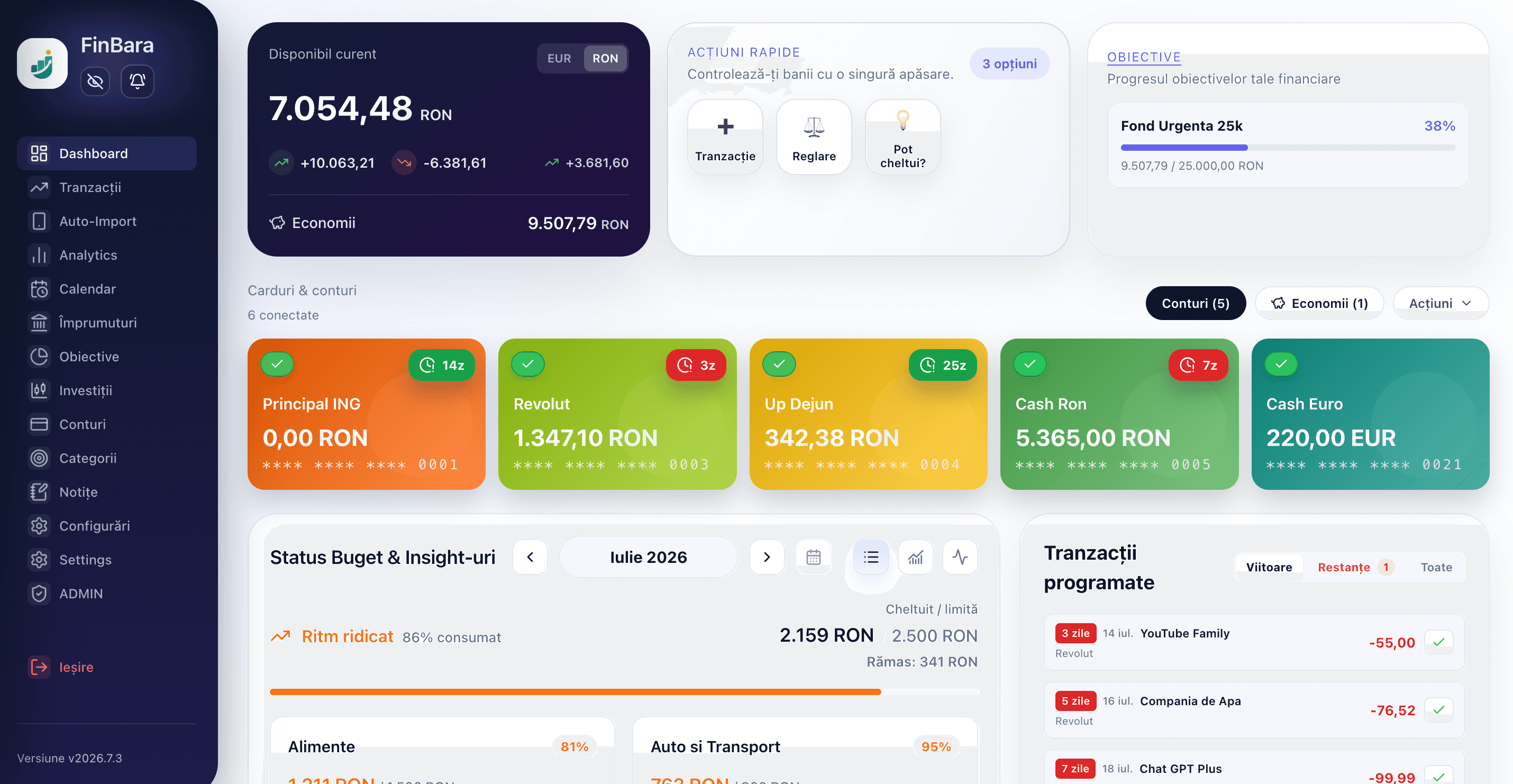
Turn spending data into budget limits
Budgeting for a goal isn't about punishing yourself. It's about assigning boundaries to categories that tend to expand when left alone. If dining out, impulse shopping, or convenience spending is crowding out the goal, those categories need explicit monthly limits.
A good category budget has tension in the right places. It protects essentials, leaves room for normal life, and creates a deliberate surplus for the target you care about.
Try this decision process:
- Start with categories that vary. Fixed bills don't offer much room. Flexible spending does.
- Cut the least meaningful spending first. A budget lasts longer when it removes low-value habits instead of everything enjoyable.
- Leave a buffer. Plans fail when every category is set at the edge of perfection.
- Name the trade-off. If one category goes over, decide which category or contribution absorbs it.
That last point is where many people go wrong. Overspending without a rule creates chaos. Overspending with a rule creates a manageable adjustment.
Schedule the action before motivation fades
The strongest budgeting move is turning the goal contribution into a scheduled event. That removes repeated decision-making. You don't ask yourself each month whether you feel like saving. The plan already answered.
Research highlighted in this analysis of probability-of-success planning and follow-through notes that people are 65% more likely to achieve a goal if they commit to an accountability partner, and it also recommends implementation intentions in an if-then format, such as a transfer triggered by the first day of the month.
That works because the rule is concrete. “I should save more” is a hope. “If salary lands, then a contribution moves to my goal” is a workflow.
Working habit: Tie the transfer to a date or trigger you can't miss, such as payday, rent day, or the first calendar day of the month.
The video below shows the kind of recurring setup that makes budgeting and scheduling feel less theoretical and more mechanical.
A simple schedule you can actually live with
Not every scheduled contribution has to be monthly. Different income patterns call for different rhythms.
| Income pattern | Better schedule style | Why it helps |
|---|---|---|
| Fixed salary | Same day each month | Predictable and easy to review |
| Variable freelance income | Percentage-based after each payment | Adapts to uneven cash flow |
| Mixed income | Base monthly transfer plus ad hoc top-ups | Keeps momentum without overcommitting |
If you share finances with a partner, this is also where accountability gets practical. Don't use accountability as vague encouragement. Use it as a review ritual. One person checks whether the scheduled transfer happened. The other reviews whether the budget categories stayed inside limits. Simple roles work better than broad promises.
A goal-driven budget isn't complicated. It's just honest. It reflects what you spend, limits what drifts, and schedules the actions that move the goal forward.
Track Progress and Adapt Your Plan
A financial goal planner isn't finished when the budget is set. It proves its value during review. Progress tracking is where you catch drift early, correct bad assumptions, and decide whether the plan still fits the month you're living through.
Review the plan like an operator
Most reviews don't need to be long. They need to be specific. Open the dashboard, look at the categories, compare actual spending to the limits you set, and check whether the goal contribution landed as planned.
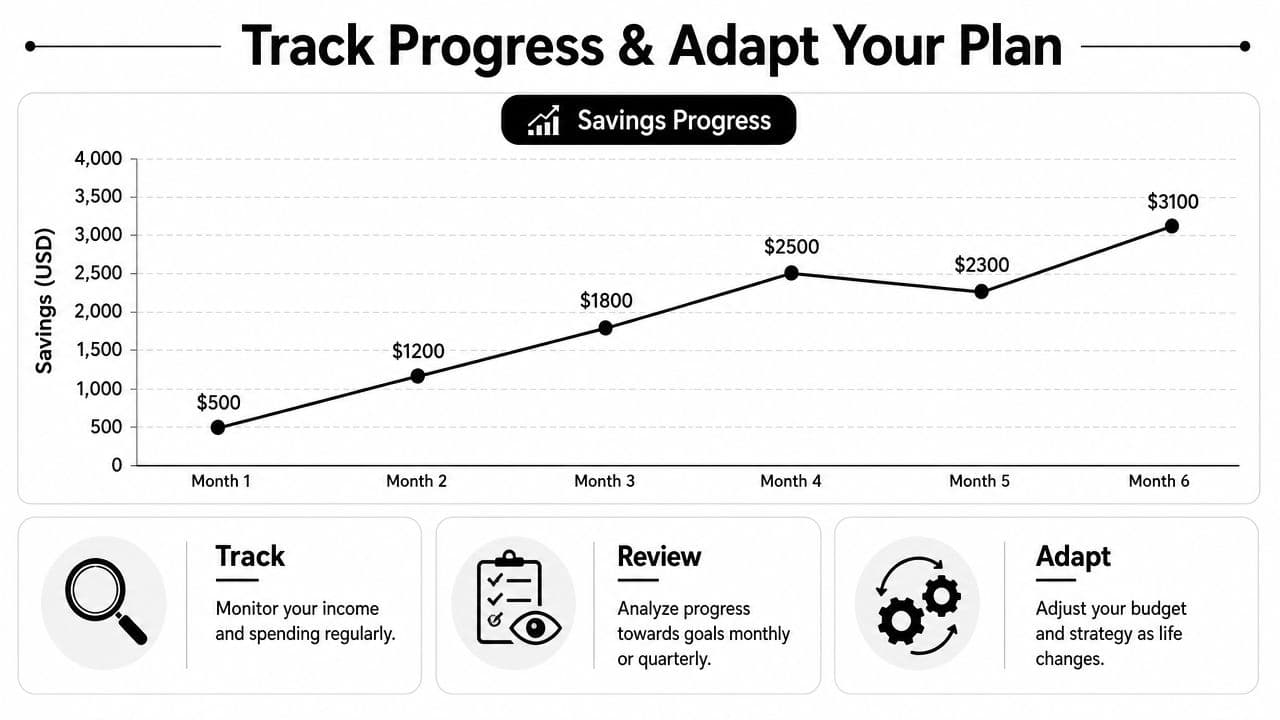
A useful review asks questions like these:
- Did the contribution happen on schedule?
- Which category broke the plan first?
- Was the overspend a one-off or a pattern?
- Does the goal timeline still look realistic?
Those questions work because they focus on decisions, not guilt. You're not holding a trial. You're running a feedback loop.
If you want a model for that top-level view, this personal finance dashboard page reflects the kind of consolidated analytics that make monthly review faster.
Review data with curiosity. Judgment hides patterns. Curiosity exposes them.
Adjust without abandoning the goal
A good plan bends. It doesn't shatter the first time a repair bill, family event, or uneven income month appears. The wrong response is usually all-or-nothing thinking. People either ignore the disruption or give up on the goal entirely.
A better response is controlled adjustment:
- Label the variance clearly. Was it an emergency, poor planning, or ordinary seasonal spending?
- Move one lever at a time. Change the contribution, timeline, or category limits. Don't rewrite everything at once.
- Protect the habit if possible. Even a smaller contribution keeps the routine alive.
- Record the reason. You'll make better decisions next month if you know why the current month changed.
This is also why visual progress matters. A graph or goal bar makes the trend obvious. You can see momentum, stalling, or recovery without trying to reconstruct it from memory.
The strongest planners treat adaptation as part of the system. They don't assume each month will be smooth. They assume real life will interfere and build a review habit strong enough to absorb it.
Advanced Tips for Staying Motivated
A long-term goal usually stops feeling exciting around the point where progress gets hard to notice. That is why motivation should come from visible evidence, not willpower. In a hands-on planner like FinBara, that means setting up the account so each contribution, imported transaction, and category decision leaves a clear trail you can review.
Use more granularity when a category gets messy
Broad categories hide the reason a plan slips. “Food” is the classic example. Groceries, weekday lunches, coffee runs, and convenience spending all land in one bucket, but they behave very differently.
Split the category with labels before you add more top-level categories. That keeps reports readable while giving you a better diagnostic view. If Apple Pay imports show repeated small transactions, labels help you separate normal routine spending from the purchases that keep pushing the month off course.
Useful label ideas include:
- Planned vs impulse
- Essential vs convenience
- Solo spending vs household spending
- Weekday routine vs weekend extras
This works well for people who want control without handing over bank credentials. You import the transactions yourself, label them with intent, and see exactly what changed. Nothing gets hidden behind an automated guess.
Make accountability concrete
Accountability works best when it is small, repeatable, and tied to one screen. A monthly check-in with a partner, friend, or even a note to yourself is enough if it answers three questions: Did the goal contribution happen? Which category drifted? What changes next month?
Another useful technique is a pre-mortem. Assume the plan goes off track and name the reason before it happens. Maybe dining out rises during busy workweeks. Maybe a quarterly bill lands in a month that already feels tight. Once you name the failure points, you can test them with low stakes. Try one month with a tighter discretionary cap. Enter a temporary expense spike into your schedule. See whether the goal still holds.
Small tests teach more than dramatic resets.
Milestones matter too, but they need to be visible and proportionate. A reward that wipes out progress defeats the point. A better marker is reviewing a filled goal bar, closing a month within budget, or seeing a scheduled transfer post on time. Those moments prove the system is working, and that proof keeps motivation steady.
If you want a hands-on way to build a financial goal planner without direct bank logins, FinBara is worth a look. It brings Apple Pay imports, quick transaction entry, budgets, scheduled transactions, savings goals, and account tracking into one user-controlled workspace so you can plan with full visibility instead of opaque automation.
Authored using the Outrank tool
Continue in FinBara
See the features that put the ideas in the article into practice.